Welcome to Goldady
Ready to experience the world of digital gold ownership? Goldady simplifies the entire process, making it as easy as shopping from your favorite online brands. From signing up and topping up to buying, selling, and even withdrawing gold bars, every step is designed to be user-friendly, secure, and transparent. Whether you’re a first-timer or a seasoned investor, we’ve got you covered. Let us show you how it all works.
Create Your Free Account
Signing up with Goldady is quick and easy — it takes just a few seconds to get started:
- Start RegistrationStart by clicking the “Register” button in the top menu.
- Fill in Your DetailsEnter your username, password and email. Agree to the terms and conditions, then hit “Register”.
- Verify Your EmailCheck your inbox for a One-Time Password (OTP). Enter the OTP on the verification page and click “Verify”.
- Log In and ExploreLog in with your new credentials, and you’re in!
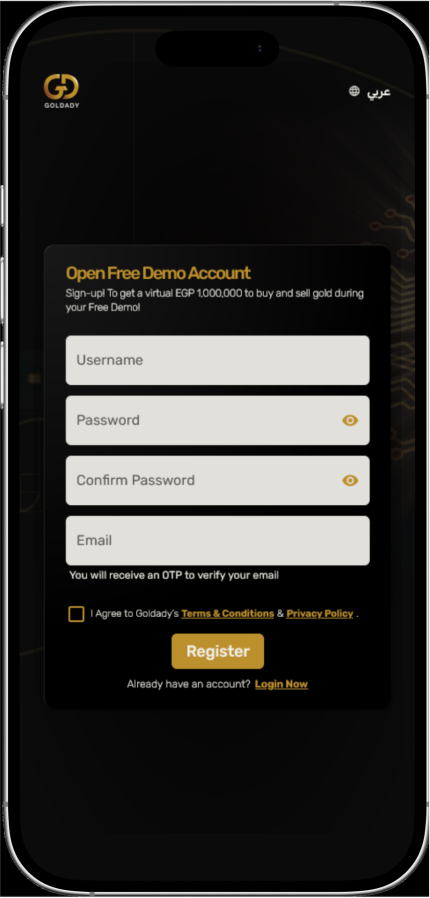
You now have access to Goldady’s demo account, where you can explore the dashboard, buy and sell virtual gold, and manage a virtual wallet preloaded with virtual cash. Practice trading with real market prices and get a feel for how simple gold investment can be — all in a risk-free environment.
Activate Your Account
Ready to invest for real? Activating your account is simple and secure. Just follow these steps to unlock full access to Goldady’s features.
How to Activate Your Account?
- In your demo dashboard, click on “Apply to Open Account”.
- A pop-up will appear with all the steps you need to complete. These steps help verify your identity and ensure the security of your transactions. Click “Start Now” to begin.
Step-by-Step Process:
- Step 1: Personal Details and Phone VerificationFill in your personal details and verify your mobile number using the OTP sent to your mobile.
- Step 2: National ID VerificationEnter your National ID details manually or upload images of the front and back for automatic extraction. This ensures your identity is verified and your rights are protected in your contract with Goldady. Your invoices are issued with your National ID name and number.
- Steps 3 & 4: Review and AcceptCarefully review and accept Goldady’s contract, privacy policy, and terms and conditions.
- Submit Your ApplicationOnce you’ve completed all the steps, click “Submit”.
- Get ConfirmationWe’ll review your application and send you an email confirmation once it’s approved.
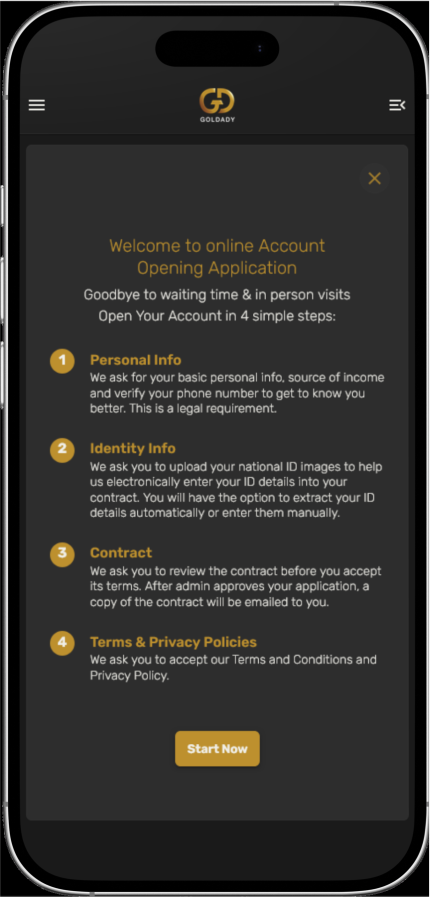
Once activated, you’ll have full access to Goldady’s platform to start building your gold investment portfolio with ease and security
Top Up Your Account
Add funds via bank transfer, InstaPay or your choice of Buy-Now-Pay-Later to credit your Goldady account. Don’t worry, your money is securely stored in a segregated clients account, keeping it safe and completely separate from Goldady’s finances.
How to Top Up Your Account:
- Access the Top-Up SectionPress on the “Top Up” button on the dashboard in the Account Balance section.
- Choose your Payment Method, it could be either by using your Bank Account or via a Buy-Now-Pay-Later
Using Bank Account
- Step 2: Upload a proof of transfer image to confirm the transaction.
- Step 3: Press the “Submit” button.
- Step 1: Select your bank name, transfer method, date of transfer, and enter the exact transfer amount.
Using Buy Now, Pay Later Apps
- Step 1: Select the Buy-Now-Pay-Later app you want to use.
- Step 2: Enter the transfer amount and click “Proceed to Top-Up”.
- Step 3: Complete the payment in your chosen app.
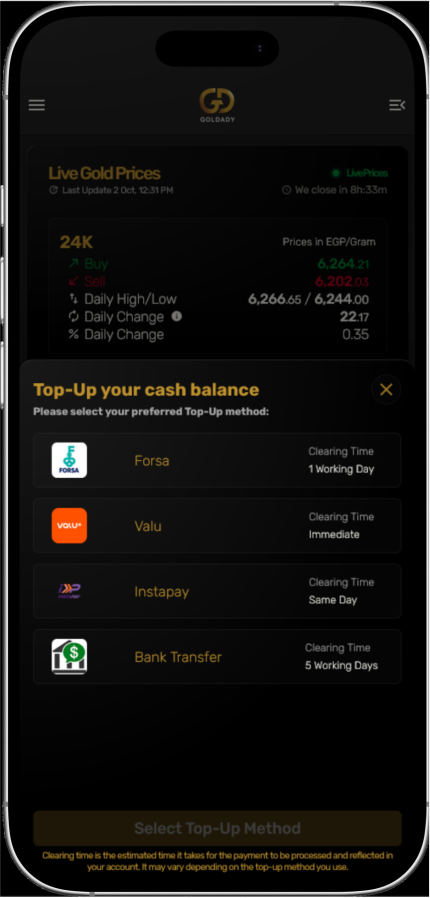
You’ll receive an email confirmation once your top-up is successful. In case, you transferred fund via a bank transfer or Instapay. It may take up to 1 working day for us to review and approve your request. Once approved, the amount will appear in your cash balance, ready to invest. Alternatively, if you made a successful Top-up via one of the Buy-Now-Pay-Later, Your Goldady cash account will be credited instantly, so you can start investing right away.
Buy Gold
Buying gold has never been easier. Enjoy real-time market prices, instant trade settlements, and full transparency.
How to Buy Gold:
- Click “Buy”Head to your dashboard and select the “Buy” option.
- Enter the AmountInput the number of grams you’d like to buy. You’ll see a full price breakdown, including Gold Value, Service Fees, and VAT on Service Fees.
- Preview and ConfirmClick “Preview” to review your transaction, then confirm your purchase.
- Your purchased gold will appear in your investment gold balance and Account Statement.The purchased amount of gold will appear in your investment gold balance and will appear in your Account Statement
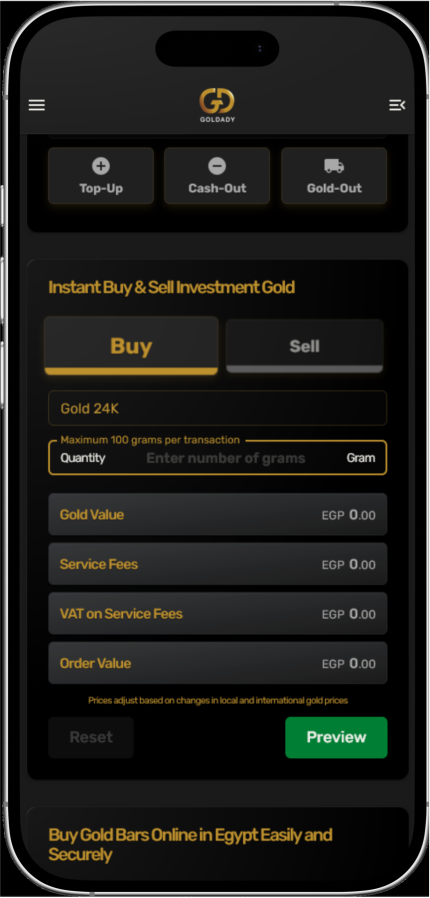
You’ll receive a confirmation email and an electronic invoice. Your purchased gold will appear in your investment gold balance and Account Statement.
Sell Gold
Selling gold has become a breeze. Enjoy real-time market prices, instant trade settlement, and full transparency.
How to Sell Gold:
- Click “Sell”Navigate to your dashboard and select the “Sell” option.
- Enter the AmountInput the number of grams you want to sell. You’ll see a detailed price breakdown, just like with purchases.
- Preview and ConfirmClick “Preview” to review the transaction, then confirm your sale.
- Your investment gold and cash balances will reflect the updated amounts after the sale and the transaction will appear in your Account Statement.The investment gold and cash balances will reflect the updated amounts after the sale and the transaction will appear in your Account Statement.
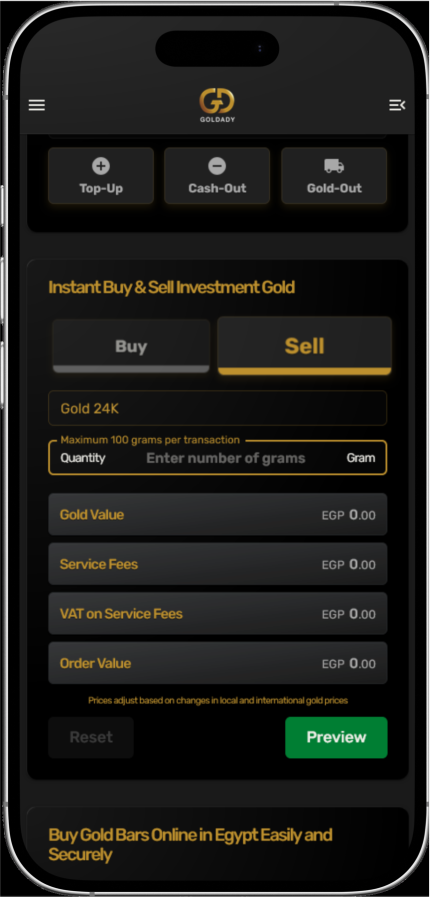
You’ll receive a confirmation email and an electronic invoice. Your investment gold and cash balances will reflect the updated amounts after the sale and the transaction will appear in your Account Statement.
Cash-Out
Ready to withdraw your cash? Goldady makes it simple and secure. Here’s how it works:
- Transfer your cash balance to your bank account
- Check your Available Balance
- Enter the Transfer Amount you want to receive in your bank account
- Press on Submit Cash-Out Request button
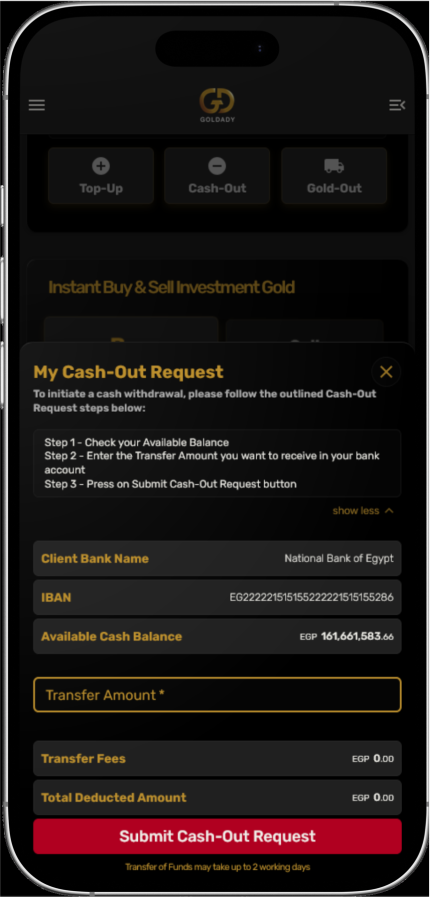
You’ll receive a confirmation once your transaction is processed, and your cash balance on the dashboard will update accordingly.
Gold-Out
Ready to withdraw your physical gold? Goldady makes it simple and secure. Here’s how it works:
- Access the Gold-Out OptionClick on the “Gold-Out” button under Account Balance on the Dashboard.
- Select Your Gold Withdrawal DetailsView your available gold balance, select the number of bars you’d like to withdraw, and choose your preferred weight per bar (e.g. two 10-gram bars).
- Choose Your Delivery Method:
- Home Delivery: Enter your address to have your gold safely delivered to your door. Delivery may take up to 5 working days.
- Office Pickup: Opt to pick up your gold from the Goldady office.
- Submit Your RequestClick “Submit” to complete the process.
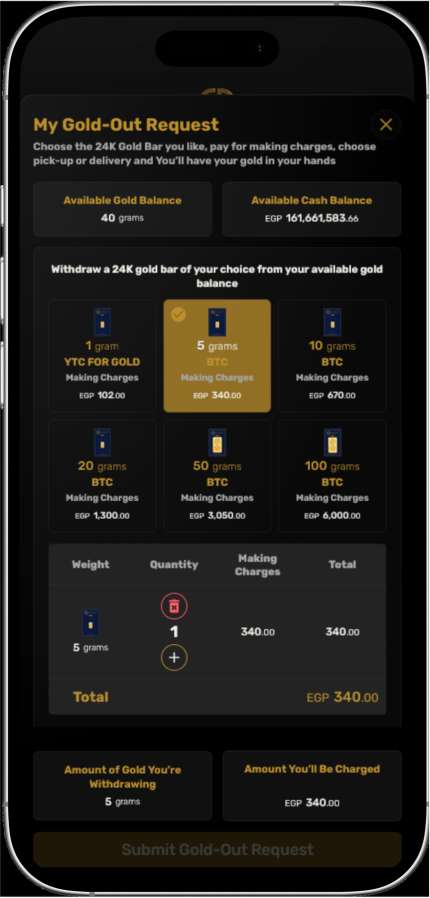
You’ll receive a confirmation email, and we’ll notify you as soon as your request is processed. Your investment gold and cash balances on the dashboard will update accordingly.
Buying Cast Bars
Not only an investment gold platform, Goldady also makes buying gold & silver cast bars simple and straightforward. Here’s how to do it:
How to Buy Cast Gold Bars:
- Browse the Gold & Silver Bars CarouselBrowse the Gold & Silver Bars Carousel
- Review Bar DetailsView the details, including weight, karat, and a full price breakdown. Input the number of bars you’d like to purchase.
- Proceed to Checkout
- Home Delivery: Enter your address to have your gold bars safely delivered to your doorstep.
- Office Pickup: Opt to pick up your gold bars from the Goldady office.
- Confirm Your OrderDouble-check the details and place your order.
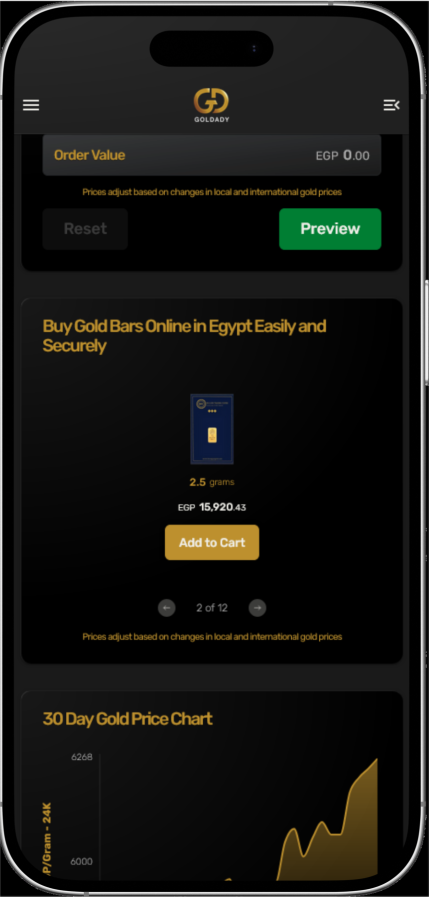
Once your order is placed, you’ll receive a confirmation email with a link to track your order. Your invoice will also be available under My Transactions → Invoices in the sidebar menu.
Tracking Transactions
Every move you make on Goldady’s platform is easy to track and manage with these features on the sidebar menu:
- My TransactionsA complete overview of all your transactions, requests, and invoices. Keep track of every move.
- My OrdersEasily access details of your gold-out orders and cast bar purchases in one convenient place.
- Account StatementsTrack detailed statements for your investment gold and cash balances. Transparency and accessibility are built right in, with monthly views and direct links to each transaction invoice.
How Goldady’s Referral System Works
Ready to earn rewards effortlessly while sharing the gold love? Goldady’s referral system lets you earn from every purchase your friends (and their friends) make. Here’s how it works:
Who Can Refer?
Referrals are available to all Goldady users with activated accounts.
Two-Tiered Rewards System
- Tier 1When your friend registers using your referral link and makes a purchase, you’ll earn 20% of Goldady’s commission on their investment gold buy/sell transactions or a fraction of the making charges earned from their gold bar purchases for 2 years!
- Tier 2If someone registers through your friend’s referral link and makes a purchase, you’ll earn 5% of Goldady’s commission on their investment gold buy/sell transactions or a fraction of the making charges earned from their gold bar purchases for 2 years!
How to Access and Use the Referral System
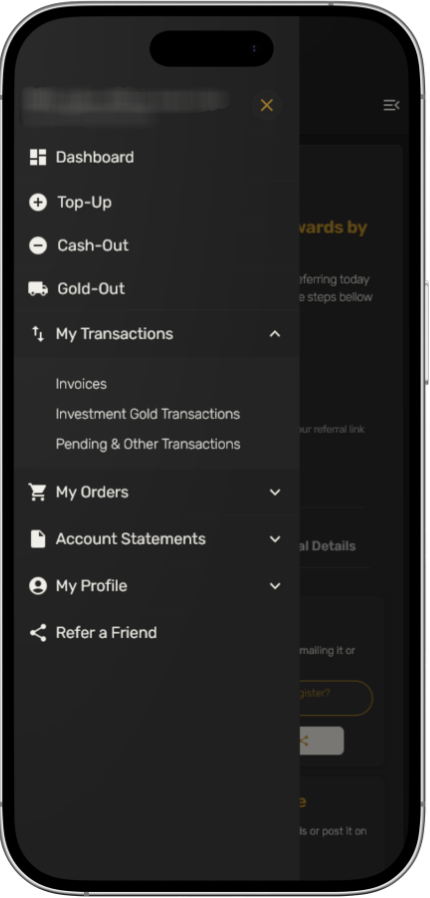
- Find the Referral SectionOpen the sidebar menu and click on “Refer a Friend”.
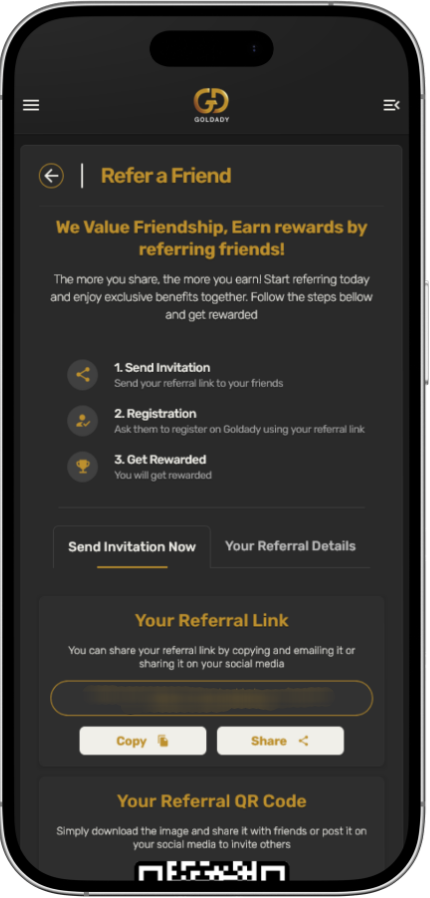
- Share Your Link or QR CodeGo to the “Send Invitation Now” tab. Copy your referral link to share directly with friends or on social media. Alternatively, download your personal QR code and share it the same way.
- Track Your ReferralsIn the “Your Referral Details” tab, you can monitor the total number of referrals and rewards you’ve earned.
Share Goldady with your circle, help them experience the financial stability of investing in gold, and enjoy ongoing rewards for every buy or sell transaction they make. It’s a win-win for everyone.
How to Buy Gold Bars from the E-Store
Goldady’s e-store makes buying physical gold bars simple and secure. Follow these steps to place your order:
- Navigate to the Products SectionNavigate to the Products section from the menu bar.
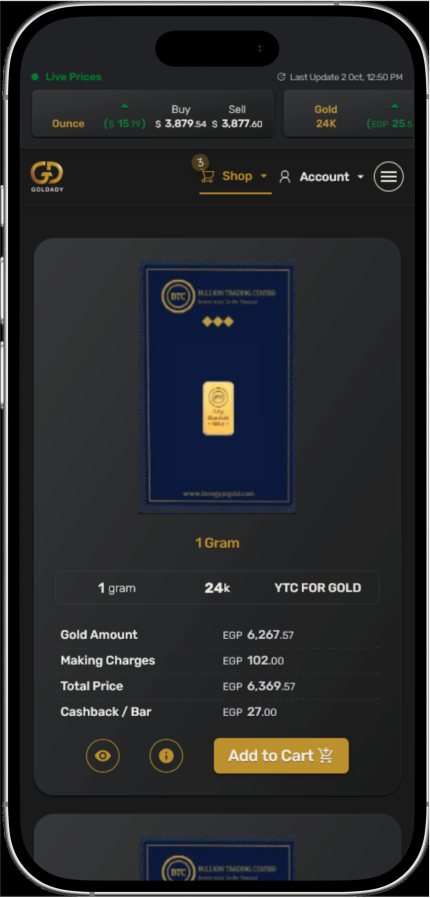
- Browse & SelectExplore the available gold bars, choose the one you’d like to buy, and click “Add to Cart”.
- Select QuantityEnter the number of bars you want to purchase.
- Continue Shopping or CheckoutAdd more products to your cart by browsing again, or click “Proceed to Checkout”.
- Choose Your Delivery MethodPickup: Collect your gold bars from the Goldady office. Home Delivery: Enter your address details for secure delivery, then click “Next”.
- Verify Your IdentityUpload the front and back of your National ID for verification. Once the system extracts your name and ID number, click “Next”. This step ensures security for all transactions.
- Confirm Your Contact InfoEnter your email and mobile number, then click “Send OTP”. Enter the verification code sent to your phone and proceed.
- Select Payment MethodChoose how you’d like to pay, then click “Next”.
- Review & Place Your OrderOn the order overview page, double-check all details. You can go back to edit or click “Place My Order”.
- Once your order is placed, you’ll receive a confirmation email with a link to track your shipment.
- If you have an activated Goldady account, your transaction invoice will also be available under My Transactions → Invoices in the sidebar menu on your dashboard.